
Shopify POS 2026: Setup, Pricing & DACH Country-Specific Requirements
Shopify POS 2026: Pricing, Hardware, Setup, and Cash Register Regulations in DE, AT & CH (TSE/RKSV). Remote setup from €149/hr – guaranteed solution.

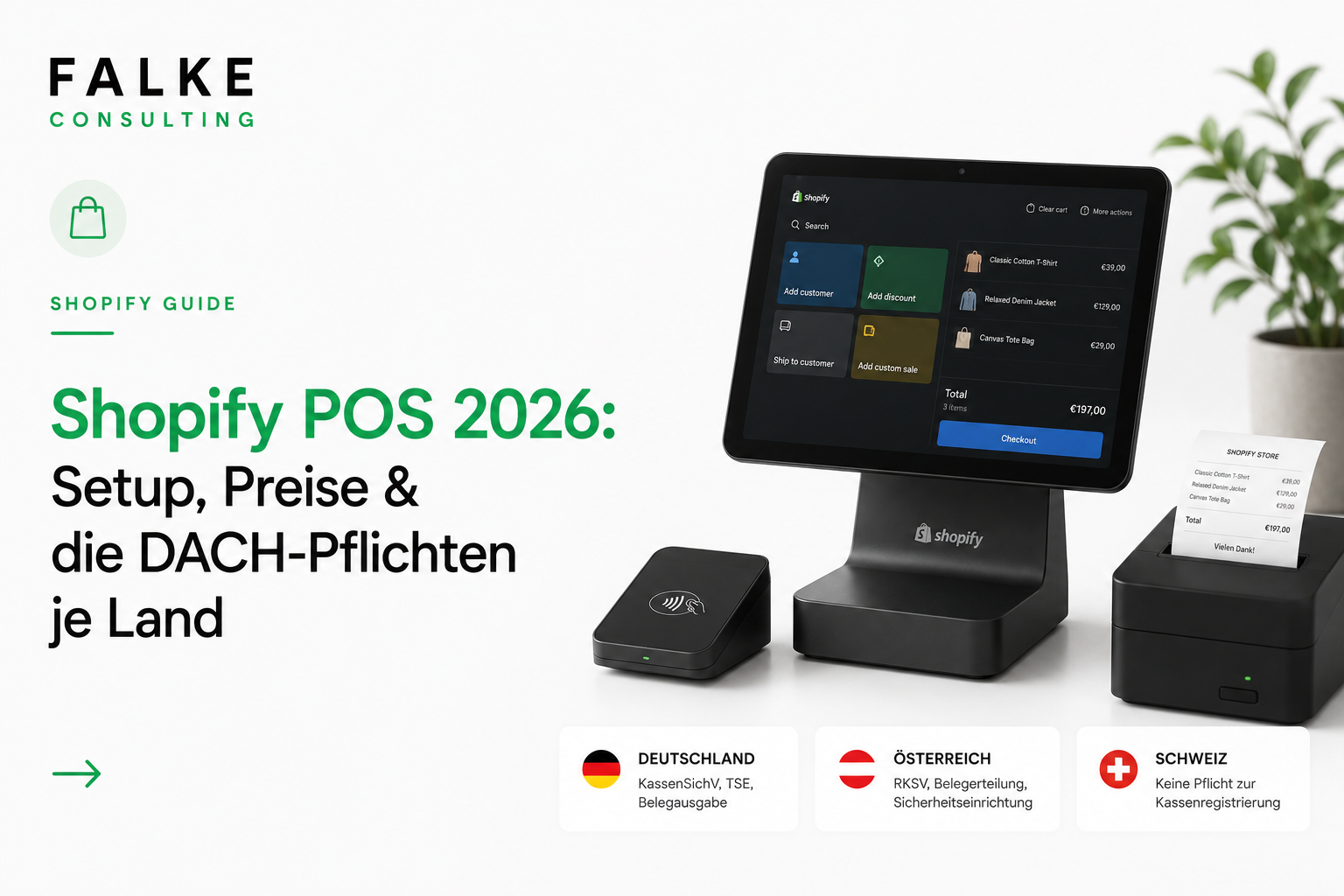
Key takeaways
- Shopify POS connects your store and online shop: one inventory, one customer base, one back office.
- POS Lite is free with every plan; POS Pro costs €79/month per location (€59 annually).
- The DACH catch: In DE (TSE/KassenSichV) and AT (RKSV), operation is not legally compliant without certified fiscalization.
- In Switzerland, there is no fiscalization requirement – CHF, TWINT, and 8.1% VAT are important.
With Shopify POS, you sell online and in-store through a single system: one inventory, one customer base, one back office. Sounds simple, but in the DACH region, there's a catch that many overlook. In Germany and Austria, Shopify POS is not legally compliant without certified fiscalization. This guide shows you the setup, current prices, and obligations per country – and how we support you with remote setup.
01What is Shopify POS? Lite vs. Pro
Shopify POS is Shopify's point-of-sale system for in-person sales. The app runs on an iPad or smartphone and is directly linked to your Shopify admin. This means that what you sell in-store is deducted from the same inventory as online. No two systems, no reconciliation, no overselling.
There are two variants. POS Lite is included free with every Shopify plan and is sufficient for pop-ups, markets, or a small store with a manageable team. POS Pro is the paid upgrade per location and provides the features a real retail business needs: unlimited staff accounts with roles and permissions, inventory counts directly at the checkout, cross-location exchanges, reports per branch, and omnichannel features like click & collect.
02Prices: POS Lite, POS Pro & Fees
Software costs are clear. Hardware and, in the DACH region, fiscalization tend to be more expensive. Here is the software side (as of 2026, EUR):
| Variant | Price | For whom |
|---|---|---|
| POS Lite | free (in every plan) | Pop-ups, markets, small store |
| POS Pro | €79/month per location (€59 annually) | Permanent store, team, multiple branches |
| Transaction (in-person) | from approx. 1.5% with Shopify Payments | lower than online |
| TSE/RKSV App (DE/AT) | from approx. €15/month per till | Mandatory, see section 04 |
Good to know: POS Pro can be subscribed to and canceled monthly. If you only need more features for the Christmas season, you activate Pro for two months and then deactivate it again. How this fits into the total costs of your plan can be found in the article on Shopify Costs 2026 and in the Plan Comparison.
03Hardware: What you really need
You don't have to buy the most expensive complete set. To start, a device you probably already own, plus a card reader, is sufficient. Shopify can send receipts by email or SMS if desired, so a receipt printer is not mandatory for everyone (but useful for signed receipts in DE/AT, see section 04).
- Minimal setup: Smartphone/tablet + Tap & Chip card reader (from approx. €49). Ideal for pop-ups and markets.
- Store setup: iPad + WisePad 3 + receipt printer + stand. Complete from approx. €1,100 one-time. The iPad is considered the gold standard.
- Professional location: POS Terminal (from approx. €349) for high foot traffic and a fixed checkout area.
Important: Full Shopify hardware and Shopify Payments for in-person sales are only available in selected regions. Before purchasing, check what is supported at your location (DE, AT, CH). We clarify this with you during setup.
04DACH Obligations per Country: DE, AT, CH
This is the most important section – and the one where many fail. Shopify POS does not natively include German or Austrian fiscalization. You need a certified app for this. What applies in which country:
| Country | Obligation | Solution |
|---|---|---|
| Germany | KassenSichV: certified TSE, receipt issuance obligation, GoBD | Cloud-TSE app (e.g., OpenFiskal, fiskaly), from approx. €15/month per till |
| Austria | RKSV from €15,000 annual/€7,500 cash turnover: signed receipts, FinanzOnline | App with A-Trust certificate (e.g., OpenFiskal) |
| Switzerland | No fiscalization obligation | CHF, TWINT, correct VAT 8.1% |
Attention: Without a certified TSE (DE) or RKSV (AT) solution, your Shopify POS sales are not legally compliant – tax audits may result in estimations and fines. Plan for fiscalization before your first sale. Basics for legally compliant processes: GTC & Returns in Checkout. No legal advice.
05Setup in 6 Steps
- Create location: In the Shopify admin under "Locations", add your branch so that inventory is correctly assigned.
- Install POS app: Free for iOS/Android, log in, select location.
- Fiscalization (DE/AT): Connect TSE/RKSV app, register till, complete FinanzOnline registration in AT. This step is the trickiest.
- Payment & Hardware: Activate Shopify Payments, pair card reader/printer, make a test sale.
- Team & Permissions: Create staff accounts, assign roles (POS Pro), set up Smart Grid for quick items.
- Enable Omnichannel: Activate Click & Collect, in-store returns, and unified customer data.
06Omnichannel: The Real Added Value
The real reason for Shopify POS is not the checkout itself, but the integration of store and online shop. A few levers that directly contribute to revenue:
- Click & Collect: Buy online, pick up in store – attracts foot traffic and generates additional sales.
- Endless Aisle: Item out of stock in-store? Order online directly at the checkout and have it shipped home.
- One Customer Base: Purchase history from store and shop is combined – better advice, more targeted emails.
- One Inventory: Real-time inventory synchronization, no duplicate maintenance, no overselling.
Our overview of the best Shopify apps 2026 shows which apps meaningfully complement the setup.
07What is NOT possible – honest reality check
- No native fiscalization: TSE (DE) and RKSV (AT) must be retrofitted via a third-party app. Without it, operation is not legal.
- Signature printing on the receipt usually requires POS Pro plus a suitable printer.
- Hardware & Shopify Payments are not fully available in all regions – check location beforehand.
- Pure offline operation without a shop is possible (Retail plan), but Shopify only truly leverages its strengths in combination with the online shop.
08Help with setup – from €149/hr, remote
You want to sell, not debug fiscalization apps for hours. That's exactly what we're here for. We set up your Shopify POS completely remotely – you don't need an on-site team, everything runs via screen sharing and secure access. We handle TSE/RKSV setup (DE & AT) including FinanzOnline, locations, inventory, staff roles & Smart Grid, hardware & Shopify Payments including test sale, click & collect, and a brief team training.
Setup from €149 per hour, fully remote – your POS problem is guaranteed to be solvable. Schedule an appointment →
09Conclusion: Is Shopify POS worth it for you?
Shopify POS is suitable if you already have a Shopify shop and sell both online and offline, want one inventory and customer base instead of two systems, and are willing to set up fiscalization (DE/AT) properly. For merchants with an online shop and a physical store, Shopify POS is one of the cleanest omnichannel solutions on the market. The only real stumbling block in the DACH region is fiscalization – and we take care of that for you.
Frequently Asked Questions
How much does Shopify POS cost?
Is Shopify POS legally compliant in Germany and Austria?
Do I need POS Pro or is Lite enough?
Is there also a cash register obligation in Switzerland?
Can you handle the complete setup?

Seit Jahren setze ich Shopify-Shops für Marken im DACH-Raum um — von der Migration über den Relaunch bis zur Conversion-Optimierung. In diesem Blog teile ich, was in echten Projekten funktioniert.

Mehr aus deinem Shopify-Shop holen?
Lass uns in einem kostenlosen Erstgespräch herausfinden, wo bei dir der größte Hebel liegt — technisch, inhaltlich oder bei der Conversion.
Kostenloses Erstgespräch buchen